Honeycomb Alpha Yoke vs Logitech Yoke — Which Wins
This Decision Has Gotten Complicated With All the Conflicting Advice Flying Around
As someone who spent three weeks agonizing over this exact purchase, I learned everything there is to know about these two yokes — the hard way. Today, I will share it all with you. Including the part where I made the wrong call the first time, ate a $130 restocking hit, and waited six weeks for a return to process. Fun times.
So when people land on comparison articles wanting a straight answer, I get it. Not a spec table. Not a bullet list of features nobody asked about. An honest account of what each yoke actually feels like when you’re two hours into a transatlantic flight in MSFS 2024 and your wrist is starting to hate you.
These are the two yokes that own the entry-to-mid sim cockpit space. The Logitech Flight Yoke System — formerly Saitek, around $160 USD at most retailers — and the Honeycomb Aeronautical Alpha Flight Controls, typically $249 USD. Close enough in price to cause real indecision. Different enough in execution that picking wrong means months of frustration. Clunky software, a yoke that wobbles mid-approach, a setup that fights your sim instead of working with it. So, without further ado, let’s dive in.
Build Quality and How They Actually Feel
Most buyers make up their mind the moment they lift either box. That instinct isn’t wrong — but it misses a few things that matter more over time.
The Honeycomb Alpha
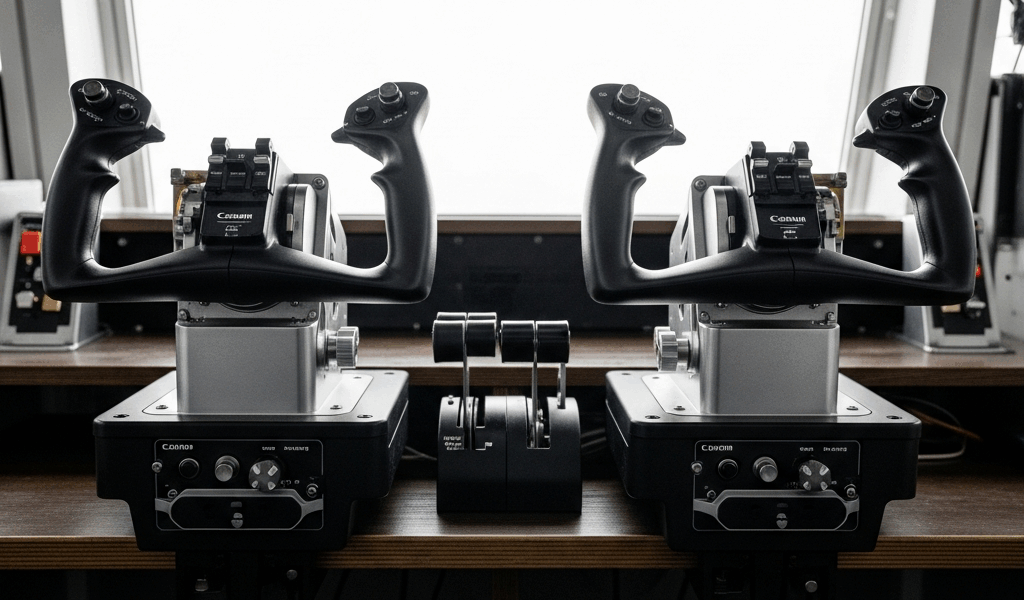
The Alpha is built around an aluminum shaft and yoke head. Pick it up and you feel it immediately — cool, solid, the kind of weight that signals quality without needing a spec sheet to confirm. Yoke travel runs approximately 90 degrees of rotation and roughly 10 cm of push-pull — replicates light GA aircraft pretty faithfully. Resistance is spring-loaded and consistent across the full range of motion. No dead zone at center. No wobble in the column. That’s what makes the Alpha endearing to us sim pilots who’ve fought slop and drift on cheaper hardware.
After 50 hours of accumulated use — actual flight hours, not marketing language — the Alpha shows almost zero loosening in the mechanism. The desk clamp is dual-sided with rubber pads, grips a 25mm desk edge without shifting. Buttons on the yoke head feel tactile and positive. The trim switches, landing gear lever, and ignition rotary on the base are particularly well-executed. The base is largely plastic, which surprises people. But the structural components are metal where it counts.
The Logitech Flight Yoke System
The Logitech yoke is mostly plastic. Not a death sentence — it’s glass-reinforced, genuinely sturdy — but it flexes in ways the Honeycomb doesn’t. The column has a noticeable amount of lateral slop. Not catastrophic. You feel it, though. Push-pull travel is similar to the Alpha, but the resistance profile is different: softer center, heavier at the extremes. Some pilots prefer that for slow aircraft. I found it slightly artificial, honestly.
The clamp is single-sided, plastic thumbscrew mechanism. On a standard desk it holds fine. On anything thin or beveled, you’re reaching for zip ties within a week. Don’t make my mistake — check your desk edge before ordering. The throttle quadrant bundled in the Logitech package does add genuine value, though. The Alpha ships with no throttle included. That gap matters when you’re doing an honest price comparison.
Long-session comfort on the Logitech is actually decent. Wider yoke head, distributes grip differently — some people prefer it. After extended sessions I noticed the plastic construction transmitted more vibration from the spring mechanism into my hand than the Alpha does. Small detail. Real one.
Software Setup and Sim Compatibility
Probably should have opened with this section, honestly. Build quality matters — but software is where sim setups either thrive or quietly destroy your enthusiasm over several frustrating weekends.
Honeycomb Alpha with MSFS 2024 and X-Plane 12
The Alpha runs a straightforward HID implementation. Plug it in, MSFS 2024 recognizes it immediately — no driver installation, no setup ritual. The Honeycomb SDK provides deeper sim integration, particularly for backlit button states. Battery switch illumination responding to in-sim electrical state, that sort of thing. In practice it works reliably once you’ve completed initial button mapping.
X-Plane 12 handles the Alpha cleanly. Calibration runs through X-Plane’s built-in hardware menu without drama. I’m apparently thorough enough to have logged dozens of flights without a single axis drift issue — and the Alpha works for me while other hardware never quite settled. The only real friction point is that the button count is high enough that meaningful mapping requires actual planning time. It’s not set-and-forget. But that’s a feature pretending to be a problem.
Logitech with MSFS 2024 and X-Plane 12
The Logitech yoke requires Logitech Gaming Software or G HUB installation for full functionality. This is where things get messy. G HUB has a well-documented history of conflicts with flight sim peripherals — I’ve personally experienced axis dropout in MSFS when G HUB auto-updated overnight, requiring a full recalibration session the next morning before a scheduled group flight. Not every user hits this. Enough do that it’s worth stating plainly.
Out of the box in MSFS 2024, the Logitech yoke does function. But calibration through Windows Game Controllers — joy.cpl if you know, you know — is often necessary to address center offset issues. X-Plane 12 integration is reliable once calibrated. The throttle quadrant axes register as separate axes, which is actually useful for custom assignments. But you’re doing more setup work to get there.
But what is the core software difference here? In essence, it’s friction — the Honeycomb introduces almost none, the Logitech introduces some. But it’s much more than that. It’s the difference between a Saturday afternoon of actual flying and a Saturday afternoon of troubleshooting why your elevator axis is reading 30% deflection at rest.
Who Should Buy the Honeycomb Alpha
The Honeycomb Alpha might be the best option here, as serious sim flying requires precision hardware that doesn’t introduce artificial limitations. That is because when you’re practicing IFR approaches or logging real training hours, yoke slop and software hiccups stop being minor annoyances and start costing you actual skill development.
Buy the Alpha if you’re logging 10-plus hours per week and pairing it with a dedicated throttle quadrant — the Honeycomb Bravo at $259 USD, or something like the Virpil MT-50CM3 if you’re going deeper. The metal construction and precise center feel pay dividends in approach training where input accuracy actually matters.
It’s the right call for MSFS 2024 as a primary platform, where the SDK integration adds genuine value. It’s the right call if desk clamp security matters — the Alpha stays put on a 25mm edge without drama. First, you should budget for a separate throttle quadrant — at least if you want a complete cockpit setup, because the Alpha ships alone at $249.
The weaknesses are real. No throttle included. The ecosystem asks you to spend more to finish the cockpit. And Honeycomb has faced stock shortages that Logitech simply doesn’t — that was a genuine problem through 2022 and 2023 and it’s worth checking current availability before you commit.
Who Should Buy the Logitech — And the Final Verdict
The Logitech Flight Yoke System makes sense for someone entering the hobby who wants a complete bundle — yoke plus throttle quadrant — without crossing $200. That throttle quadrant is genuinely usable and saves real money in the short term. While you won’t need commercial-grade hardware to enjoy casual sim flying, you will need a handful of patience for the software setup side of things.
If your sim hours sit under five per week, the build quality gap between the Logitech and the Alpha won’t affect your experience enough to justify the price jump. That’s not a consolation prize — that’s an honest use case. It’s also a reasonable choice for a parent setting up a sim station for a teenager. Durable enough for casual use, forgiving in setup, and replaceable cheaply if something goes wrong. The G HUB issues are manageable if you stay on a stable driver version and kill auto-updates before they ambush you.
Frustrated by the plastic flex and soft center feel during serious IFR practice sessions, I eventually switched to the Alpha — using a Honeycomb Bravo pairing and a proper 3-inch desk clamp from a local hardware store. This new setup took about a weekend to dial in and eventually evolved into the sim cockpit configuration that enthusiasts know and rely on today. The Logitech is where plenty of people start. The Alpha is where most end up.
The verdict: For most buyers who’ve moved past the curiosity stage and actually log regular sim hours, the Honeycomb Alpha wins. It flies better, lasts longer, integrates more cleanly with both major simulators, and feels like actual equipment rather than a peripheral. The price gap is real — $249 versus $160 — but it closes fast once you factor in the throttle quadrant you’ll inevitably want anyway. The Logitech wins for budget-constrained beginners who need a complete bundle today and aren’t ready for a tiered setup. But if you’re asking which yoke you’ll still respect after a hundred hours at the desk? That’s the Honeycomb Alpha. Not close.


Stay in the loop
Get the latest ultimate flight simulators updates delivered to your inbox.