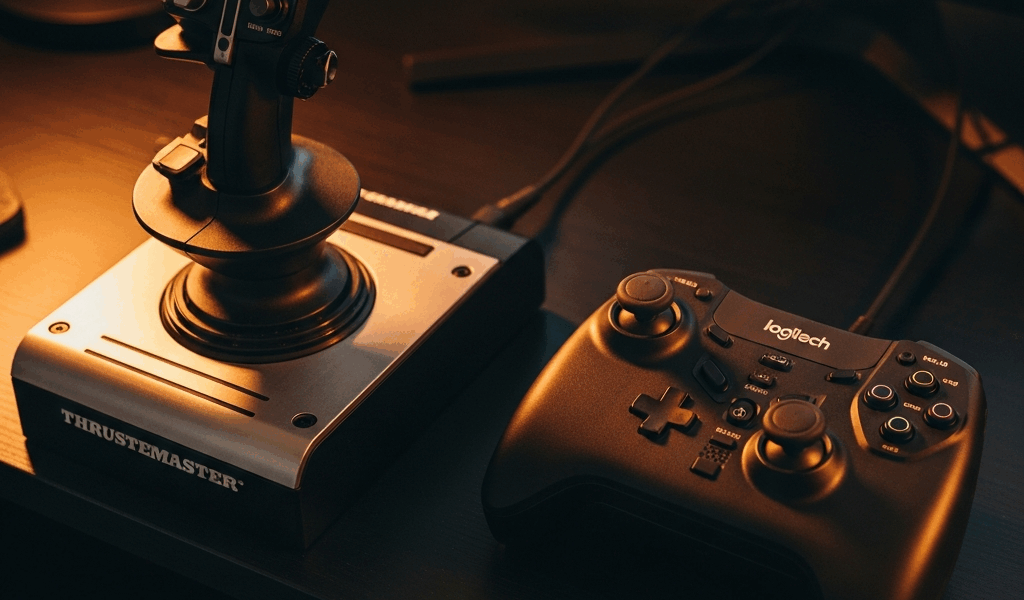
Airbus Pilot or Fighter Pilot — That Determines Your HOTAS
The Thrustmaster TCA vs Logitech X56 debate has gotten complicated with all the conflicting takes flying around sim communities. As someone who spent three months bouncing between both setups — running MSFS 2020 with the Fenix A320 on the TCA, then switching to DCS World with the X56 for F/A-18 carrier ops — I learned everything there is to know about these two controllers. Today, I will share it all with you.
Here’s the short version: these aren’t competing products. The Thrustmaster TCA Sidestick Airbus Edition is modeled directly on real Airbus sidestick geometry. The Logitech X56 Rhino is a traditional military-style HOTAS — grip looks like it belongs in an F-16. Different cockpits. Different tools. Not in a marketing-speak way. In a real, tactile, “this was designed for a specific aircraft” way.
So, without further ado, let’s dive in — because the details matter when you’re dropping $150–$350 on sim hardware.
This article includes affiliate links. We may earn a commission at no extra cost to you.
Thrustmaster TCA Sidestick Airbus Edition
But what is the TCA, really? In essence, it’s a consumer joystick engineered to replicate Airbus sidestick geometry. But it’s much more than that — it’s one of the only mid-range controllers that actually replicates the short-throw, authority-limited feel of the real thing. Thrustmaster pulled this off at $59.99 for the stick alone. The full Officer Pack — sidestick plus throttle quadrant — runs around $179.99 depending on where you shop.
First thing you notice out of the box: it doesn’t center like a normal stick. Spring-loaded, yes. But there’s that distinctive short throw — and Thrustmaster has replicated it surprisingly well. The grip is compact. Noticeably shorter than the X56’s. For smaller hands, genuinely a plus. For larger hands over long sessions, it cramps up. I learned this the hard way during a transatlantic MSFS flight. Four hours in, my hand was done. Took me embarrassingly long to figure out that moving the stick about 15cm back from the desk edge fixed nearly all of it. Don’t make my mistake.
Build Quality and Feel
Plastic throughout — no getting around it. The throttle quadrant in the Officer Pack is especially plastic-y. Levers have decent resistance but no premium feel. The sidestick itself is better. Weighted base, smooth stick movement, no dead zones straight out of the box. Thrustmaster ships it calibrated well, which matters more than most people realize.
Button count on the sidestick: 5 buttons, 1 hat switch, 1 ministick, and a trigger. Lean. Minimalist, even. That’s intentional — the real Airbus sidestick isn’t bristling with switches either. The throttle quadrant adds considerably more: 3 throttle levers, flap detents, spoiler axis, additional buttons. Together they cover most MSFS operations without feeling overwhelming.
How It Maps to MSFS Airbus Aircraft
Probably should have opened with this section, honestly. Because this is where the TCA earns everything. Thrustmaster built native A320 family profiles, and in MSFS they map almost perfectly to real Airbus workflows. The throttle quadrant has physical detents at TOGA, FLX/MCT, CL, and IDLE — the exact positions from a real Airbus thrust lever. Flying the FlyByWire A32NX mod with the TCA Officer Pack is the closest desktop recreation of an Airbus cockpit you’ll find anywhere near this price. That detent system alone justifies the purchase for anyone who primarily flies Airbus-type aircraft. No other mid-range HOTAS gives you that out of the box.
- Native Airbus profiles for MSFS included
- Physical throttle detents at correct positions
- Sidestick geometry matches real Airbus feel
- Works with Thrustmaster’s TARGET software for advanced mapping
- Compatible with PC via USB — no proprietary drivers required at basic level
Logitech X56 Rhino HOTAS
The X56 Rhino is a different animal entirely. Heavier. More aggressive. The full HOTAS retails around $199.99–$249.99 and includes both joystick and a dedicated throttle unit — worth noting because the TCA sidestick sold alone doesn’t include the throttle. Full Officer Pack versus full X56. That’s the honest comparison.
Surprised by how substantial the X56 felt straight out of the box, I immediately threw it into a DCS World F/A-18C session. The weight difference from the TCA is immediately obvious — heavier base, longer throw, more resistance. For combat sims, that longer throw translates directly to finer control inputs. The TCA’s short travel that works beautifully for Airbus flying? Mild liability when you’re trying to precisely track a bandit at 400 knots. That’s what makes the X56 endearing to us DCS pilots — it was built for exactly this kind of flying.
Button Count and Axes — Where the X56 Dominates
This is not close. The X56 stacks inputs like nothing else at this price point:
- Joystick: 6 buttons, 2 hat switches, 1 ministick, 1 scroll wheel, trigger with two-stage actuation
- Throttle: 2 ministicks, 4 hat switches, 13 buttons, 3 rotary controls, 2 toggle switches, 1 scroll wheel
- Total axes: 6 axes across the system
That throttle unit is something else. The dual ministicks — one for radar slewing, one for sensor control — are genuinely useful in DCS. Most combat aircraft run multiple thumb-operated sensors, and I mapped these almost 1:1 with the real F/A-18 HOTAS schematic. That’s the difference between a good sim session and a great one.
Build Quality Comparison — Honest Assessment
Both controllers are plastic. Neither feels like a $500 Virpil or VKB product. The X56 feels slightly more solid overall — the throttle has satisfying weight, levers move with good resistance. The joystick spring system is user-replaceable, which is a thoughtful detail for long-term ownership. Default spring tension ships a little light. A stiffer spring from third-party suppliers runs about $8–$15 and makes a noticeable difference for precision flying.
One genuine complaint about the X56 — the rubber grip coating has a documented degradation problem. Well-known across Reddit threads and sim forums. After 18–24 months of heavy use, the grip gets sticky. Doesn’t affect function, but it’s unpleasant. The TCA avoids this entirely by using hard plastic throughout. I’m apparently a heavy-use pilot and the rubber coating issue showed up for me right around month 20. Something worth factoring into long-term ownership calculations.
Software and Compatibility
Both HOTAS systems work with MSFS and DCS World. Both are plug-and-play on Windows 10 and 11 via USB. Software is where they split.
Thrustmaster TARGET
Thrustmaster’s TARGET software handles mapping and profile creation for the TCA. Functional. Also dated — the UI looks like it was designed around 2012 and never touched since. Learning curve is real. I spent about two hours getting a custom Boeing 737 profile working when I first got the TCA. TARGET is powerful if you invest the time. Most TCA users never need to go deep into it though, because the Airbus-native profiles handle the heavy lifting. For MSFS basics, in-game axis and button mapping works fine without TARGET at all.
Logitech G HUB
G HUB is more modern and considerably easier to navigate. Profile creation is visual, relatively intuitive. With 6 axes and roughly 30-plus mapped inputs on the X56, having clean software matters more than people expect. G HUB handles per-application profiles — your DCS setup doesn’t bleed into your MSFS setup. Automatic profile switching is genuinely useful if you bounce between sims regularly.
DCS World has native community support for the X56 through user-created profiles on the DCS user files site. Detailed binding files exist for the F/A-18C, A-10C II, F-16C, and most other popular modules. Dramatically cuts setup time. The TCA has fewer DCS-specific community profiles — it’s simply less common in that ecosystem.
Cross-Sim Reality
Both controllers technically work across all major flight sims — MSFS, DCS World, IL-2 Sturmovik, X-Plane 12, Star Wars Squadrons, Elite Dangerous. The difference is optimization. TCA is optimized for civil aviation. X56 is optimized for combat and space sims. You can fly an airliner with the X56 — it just feels wrong. You can dogfight with the TCA — but you’ll run out of buttons fast. Neither is a universal solution.
The Verdict — Match Your HOTAS to Your Sim
Here’s the clean version: buy the TCA Officer Pack if MSFS airliner flying is your primary activity. Buy the X56 if DCS, IL-2, or space sims are where you log your hours. Don’t buy the wrong one hoping it’ll grow on you. I tried that. Six weeks forcing myself through DCS World with the TCA, convinced I just needed to adapt. The short stick throw and minimal button count were actual limitations — not adaptation challenges. That was time wasted.
Buy the Thrustmaster TCA If
- You primarily fly the FlyByWire A32NX or Fenix A320 in MSFS
- You want physical throttle detents that match real Airbus positions
- You’re newer to flight sim and want an approachable, well-mapped setup
- You prefer a compact, desk-friendly form factor
- Your budget sits closer to $180 for a complete stick-and-throttle combo
Buy the Logitech X56 If
- DCS World is your primary sim — especially F/A-18, F-16, or A-10 modules
- You play space sims like Elite Dangerous or Star Citizen
- You need maximum button and axis count for complex aircraft systems
- You want dual throttle levers with individual control
- You’re willing to spend $200–$250 for a more complete HOTAS package
One Scenario Where This Gets Complicated
If you fly both MSFS and DCS with equal frequency — and plenty of sim pilots do — this gets harder. The X56 might be the best option, as split-sim flying requires versatility. That is because the X56 handles MSFS Boeing and general aviation aircraft reasonably well while delivering genuinely excellent combat sim performance. The TCA handles MSFS brilliantly but struggles in DCS. Versatility points go to the X56, full stop.
At $179.99 for the TCA Officer Pack versus $199.99–$249.99 for the X56, the price gap is narrow enough that budget isn’t really the deciding factor. Figure out which cockpit you actually spend your hours in. That answer tells you everything you need to know.




Stay in the loop
Get the latest ultimate flight simulators updates delivered to your inbox.