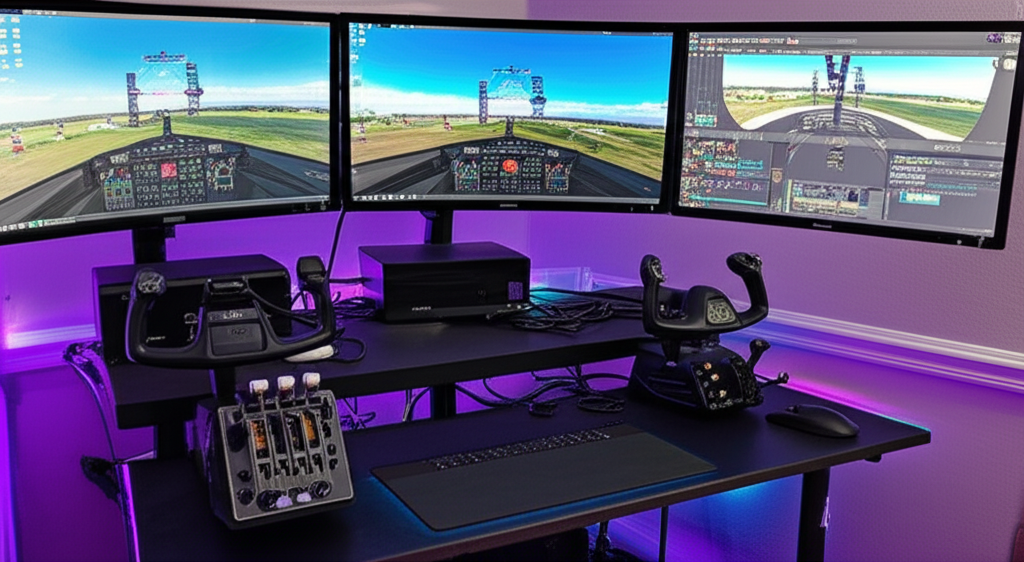
The Flight Control Decision That Defines Your Setup
Choosing between Honeycomb, Logitech, and Thrustmaster for your flight sim controls isn’t just about brand preference—it’s about what type of flying you do and how much you’re willing to invest. Each manufacturer has carved out distinct territory in the market, and understanding their philosophies helps you build the right cockpit for your needs.
Honeycomb Aeronautical: The Realism-First Approach
Honeycomb entered the flight sim market in 2019 and immediately disrupted the status quo. Their Alpha yoke and Bravo throttle quadrant set new standards for build quality and functionality at their price points.
Honeycomb Alpha Flight Controls (Yoke):
- 180-degree yoke rotation with smooth, weighted feel
- Hall effect sensors for drift-free precision
- 13 programmable buttons and switches
- Metal shaft with quality plastics
- Price: ~$280 USD
Honeycomb Bravo Throttle Quadrant:
- Six configurable levers for throttle, prop, mixture, or spoilers
- Autopilot panel with heading, altitude, and VS controls
- Annunciator panel with 14 warning lights
- Trim wheel and flap switch
- Landing gear lever with indicator lights
- Price: ~$280 USD
Best for: General aviation enthusiasts, airline simmers who want study-level immersion, anyone prioritizing realistic controls over combat functionality.
Logitech: The Legacy Standard
Logitech’s flight sim peripherals (originally Saitek) have been around for decades. The current lineup offers accessible entry points but hasn’t seen major updates in years.
Logitech Flight Yoke System:
- Self-centering yoke with basic throttle quadrant included
- 14 programmable buttons
- Stainless steel yoke shaft
- Modular design for adding panels
- Price: ~$170 USD
Logitech X56 HOTAS:
- RGB lighting with customization
- Analog ministicks on throttle
- 189 programmable commands
- Adjustable stick spring tension
- Price: ~$250 USD
Best for: Budget-conscious beginners, those wanting modular expandability through the Logitech ecosystem, space sim pilots who need HOTAS configuration.
Thrustmaster: Versatility Across Genres
Thrustmaster covers the widest range, from budget entry sticks to high-end replicas. Their strength lies in licensed products and HOTAS systems suited for both civilian and combat flight.
Thrustmaster TCA Officer Pack Airbus:
- Licensed Airbus sidestick and throttle replicas
- Authentic detents and TOGA button
- Ergonomic design matching real A320 controls
- Swappable joystick modules
- Price: ~$200 USD for the pack
Thrustmaster HOTAS Warthog:
- Licensed A-10C replica throttle and stick
- All-metal construction
- 55 programmable action buttons
- H.E.A.R.T. magnetic sensors
- Price: ~$500 USD
Best for: Airbus fans wanting authentic controls, DCS and combat sim pilots, enthusiasts willing to pay premium for metal construction and licensed accuracy.
Head-to-Head: Key Considerations
Build Quality: Honeycomb and Thrustmaster’s premium offerings use superior materials to Logitech’s current lineup. The Honeycomb Bravo’s metal switches and weighted levers feel substantially better than Logitech’s plastic equivalents. Thrustmaster’s Warthog remains the build quality king but at twice the price.
Software and Compatibility: All three work with MSFS, X-Plane, and DCS. Thrustmaster’s TARGET software offers the deepest programming options. Logitech’s software is functional but dated. Honeycomb requires no special software—it’s plug and play with standard Windows game controller support.
Desk Mounting: Honeycomb’s clamp system is rock solid. Logitech’s suction cups and clamps work but feel less secure. Thrustmaster varies by product—the TCA clamps well, while the Warthog’s weight keeps it planted without mounting.
Expandability: Logitech’s modular system allows adding radio panels, switch panels, and multi-panels. Honeycomb’s ecosystem is smaller but growing with products like the Charlie rudder pedals. Thrustmaster offers the widest accessory range through their TCA and professional lines.
Recommended Setups by Budget
Entry Level ($200-300): Logitech Flight Yoke + separate rudder pedals, or Thrustmaster T.16000M FCS HOTAS for combat-focused flying. Best value for testing whether flight simming is your hobby.
Mid-Range ($400-600): Honeycomb Alpha + Bravo combination delivers exceptional value. This setup handles everything from Cessna 172s to 737s beautifully and will last years.
Premium ($700+): Thrustmaster TCA Airbus quadrant + sidestick for airliner focus, or Warthog for military simulation. Consider adding Honeycomb’s Bravo for its autopilot panel even alongside other controls.
The Verdict
For most flight simmers focusing on general aviation and airliners in MSFS or X-Plane, the Honeycomb Alpha and Bravo represent the sweet spot of quality, features, and price. The combination outperforms anything else under $600.
Combat sim pilots should look at Thrustmaster’s HOTAS offerings—the Warthog for premium experiences or the T.16000M for budget builds. The stick-and-throttle configuration suits DCS, IL-2, and Star Citizen better than yoke setups.
Logitech remains viable for beginners testing the waters or those committed to their modular panel ecosystem, but the aging designs struggle to compete with more recent alternatives.
Whatever you choose, quality flight controls transform the simulation experience. The difference between clicking virtual buttons and flipping physical switches is immersion you have to feel to understand.


Stay in the loop
Get the latest ultimate flight simulators updates delivered to your inbox.