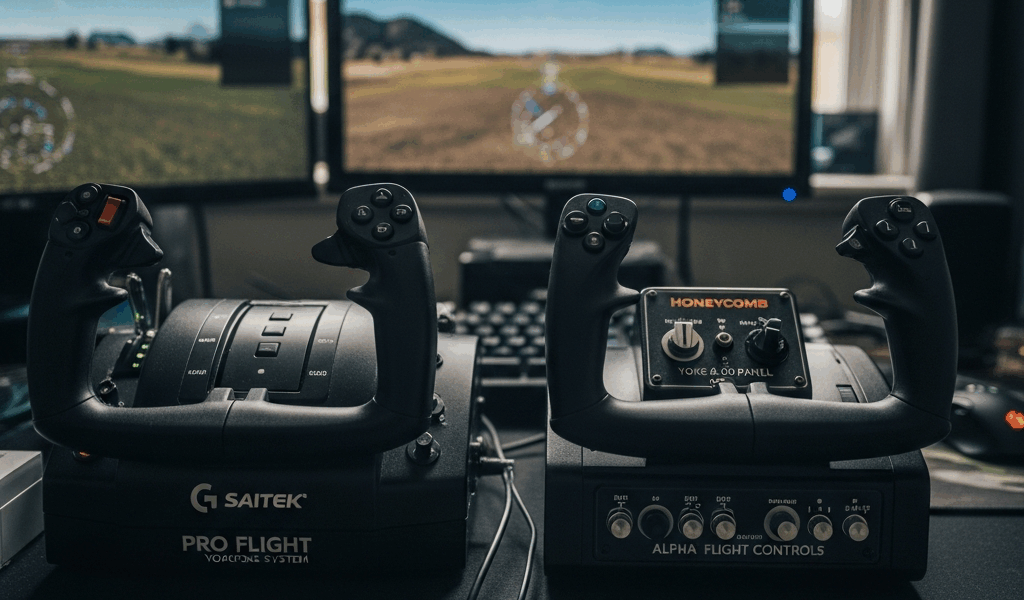
The Logitech G Pro Flight Yoke and the Honeycomb Alpha are the two yokes that dominate every “which yoke should I buy” thread in the flight sim community. One costs about $150. The other costs about $270. That $120 difference is either a waste of money or the best upgrade you will make — depending entirely on how serious you are about sim flying. Here is what the gap actually buys you, feature by feature.
The Price Gap and What It Buys
The Logitech G Pro Flight Yoke System runs $150 to $170 depending on where you find it. For that price you get a yoke, a throttle quadrant with three levers, and a desk clamp mounting system. It has been the entry point for sim pilots for years, and Logitech sells a lot of them.
The Honeycomb Alpha Flight Controls costs $250 to $280. No throttle included — just the yoke and a built-in switch panel. For that money you get hall-effect sensors instead of potentiometers, 180 degrees of roll rotation instead of 90, and an integrated panel with master battery, alternator, avionics, lights, and magneto switches. The throttle is a separate purchase (the Honeycomb Bravo goes for about $250), which makes the total system cost significantly higher.
That is the raw price comparison. But comparing just the sticker price misses the real story — the Logitech practically requires a separate switch panel ($50-70) that the Honeycomb includes, narrowing the effective gap to about $50-70.
Build Quality and Feel
The Logitech uses potentiometers for its axis sensing — physical contact sensors that slide against a resistive track as you move the yoke. They work fine initially. Over months of use, the contact surfaces wear and develop dead zones — small ranges in the axis travel where the sim sees no movement. You might notice the yoke “sticking” at center or producing jittery inputs near the extremes of travel. Some users report dead zone issues within 6 months. Others get a year or more. But potentiometer degradation is a when, not an if.
The Honeycomb uses hall-effect sensors. These measure a magnetic field rather than physical contact, which means zero mechanical wear over time. The axis will feel the same on day one as on day one thousand. No dead zones developing, no jitter from worn contacts. This is the same sensor technology used in high-end industrial joysticks and commercial sim hardware.
The physical feel is different too. The Logitech has a lighter spring resistance and a somewhat plastic feel to the shaft — it works, it is not unpleasant, but it does not feel like an aircraft control. The Honeycomb has a heavier, smoother throw with a more deliberate center detent. The shaft is metal where it matters. It feels like a piece of aviation equipment rather than a computer peripheral. That distinction matters more than it sounds — you are going to hold this thing for hours at a time.
Rotation Range Matters More Than You Think
This is the single most impactful difference between the two yokes and the one that most comparison articles gloss over.
The Logitech provides 90 degrees of total roll rotation — 45 degrees left of center, 45 degrees right. The Honeycomb provides 180 degrees — 90 left, 90 right. A real Cessna 172 yoke offers about 160 degrees of total roll travel. The Honeycomb is close to reality. The Logitech is half.
Why this matters for your flying: with 90 degrees of travel, the simulator has to map your full aileron deflection to a very short physical arc. Tiny hand movements produce large control inputs. Making smooth, precise bank angle corrections — the kind you need for a stable ILS approach or a smooth pattern turn — requires unreasonably fine motor control. You are fighting the hardware to achieve what should be natural.
With 180 degrees, each degree of physical yoke movement corresponds to roughly the same control authority as a real aircraft. Smooth inputs feel smooth. Small corrections require appropriately small movements. If you are using the sim for instrument training or just want landings that feel right, the rotation range difference is transformative. I have flown approaches on both yokes back to back, and the Honeycomb makes you a better pilot because the hardware is not working against you.
The Switch Panel Advantage
The Honeycomb Alpha includes a switch panel on the left side of the yoke base with functional toggles for master battery, alternator, avionics bus, lights (beacon, landing, taxi, navigation, strobe), and a rotary magneto switch. In MSFS and X-Plane, these map directly to the corresponding aircraft systems. Flipping a physical switch to turn on the battery before startup, then clicking through the magneto positions to start the engine — that sequence is what makes sim flying feel real rather than game-like.
The Logitech has no integrated switches. Your options are keyboard shortcuts (breaks immersion completely), clicking virtual cockpit switches with a mouse (workable but fiddly), or buying a separate switch panel. The Logitech Switch Panel accessory costs $50 to $70 and mounts on a separate piece of desk real estate. Add that cost to the Logitech yoke price, and the effective gap between the two systems shrinks to $30 to $60 — at which point the Honeycomb’s advantages in sensor technology and rotation range make the remaining gap trivial.
The Verdict
The Honeycomb Alpha is worth the extra money for anyone who plans to fly more than casually. The 180-degree rotation range and hall-effect sensors alone justify the price difference — they make you a better virtual pilot by removing hardware limitations from your control inputs. The integrated switch panel eliminates the need for a $50-70 separate accessory, which closes most of the price gap. And the build quality means you will not be shopping for a replacement yoke in 18 months when the potentiometers develop dead zones.
The Logitech G Pro is a reasonable choice if your budget is truly hard-capped at $150 and cannot stretch further. It works. Thousands of sim pilots have logged thousands of hours on it. But the honest reality is that most Logitech yoke owners upgrade to a Honeycomb within a year because the limitations become apparent once your flying skills outgrow the hardware. If you can absorb the extra cost now, you skip the upgrade cycle and the wasted money that comes with it.
Buy the Honeycomb Alpha. Pair it with a basic throttle — even a $30 single-lever USB throttle works while you save for the Bravo. You will have a yoke that grows with you from your first pattern work to your first ILS approach to your thousandth hour, and it will feel exactly as precise on that thousandth hour as it did on the first.



Stay in the loop
Get the latest ultimate flight simulators updates delivered to your inbox.