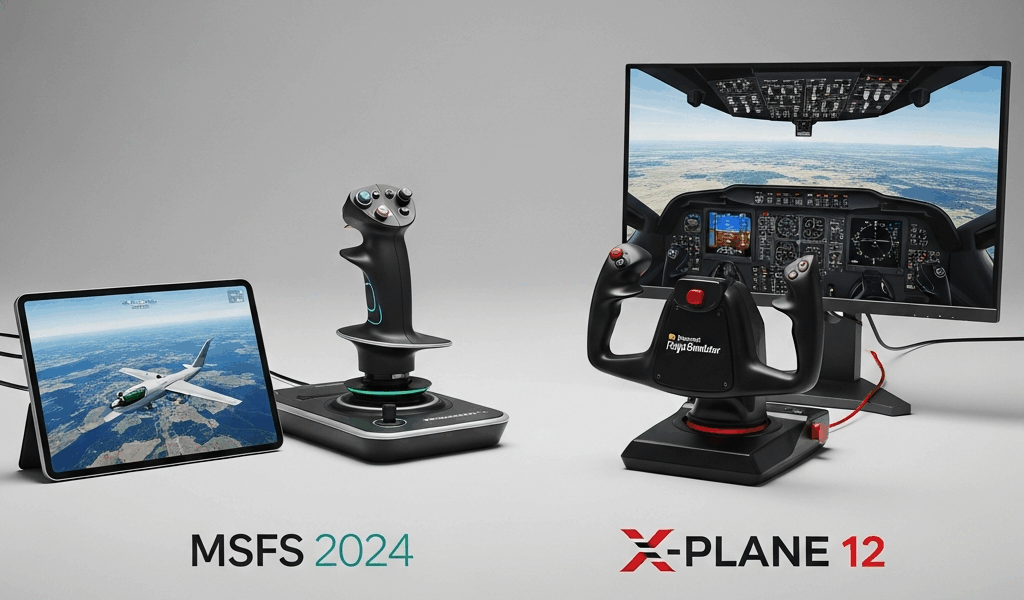
MSFS 2024 vs X-Plane 12 — Which Flight Simulator Is Worth Your Money
The MSFS 2024 vs X-Plane 12 debate has been running hot in every forum and Discord server I haunt, and after logging somewhere north of 400 hours split between both platforms over the past two years, I have a genuinely strong opinion. Both simulators cost real money. Both demand serious hardware. Neither is a casual impulse buy. So let me skip the throat-clearing and tell you what I actually think before we dig into the specifics.
The Quick Verdict — It Depends on What You Value Most
Buy Microsoft Flight Simulator 2024 if you want to be visually floored every single flight and you enjoy a wide, casual-to-intermediate flying experience. Buy X-Plane 12 if you are a real-world pilot, a student, or a hardcore sim enthusiast who will not tolerate a sloppy stall characteristic. Full stop.
I spent the first three months of 2023 almost exclusively in X-Plane 12, grinding IFR procedures in the default Cessna 172 and Laminar’s Beechcraft Baron G58. Then I switched to MSFS for a solid stretch and did long VFR cross-countries across New Zealand and Iceland. They are genuinely different tools. Calling one objectively better is like arguing whether a torque wrench is better than a socket set.
That said — one of them probably fits your specific situation better. Here is how I break it down.
Visual Quality and Scenery
This is not a competition. MSFS wins. It is not particularly close.
Microsoft Flight Simulator 2024 uses Bing satellite imagery combined with procedural photogrammetry to reconstruct the real world at a scale that still makes me stop mid-flight and just look out the virtual window. Flying the Pipistrel Velis Electro at 2,500 feet over the Scottish Highlands in MSFS and seeing the terrain actually match what you would see from a real aircraft is a genuinely moving experience. I flew over my hometown once, found my actual street, and recognised the roof of my local grocery store. That is either impressive technology or a sign I need to get outside more. Probably both.
Photogrammetry and Satellite Imagery
X-Plane 12’s default scenery relies on orthophoto tiles and procedurally generated autogen buildings. It is functional. It is not beautiful. Flying into a major city in X-Plane without third-party scenery add-ons feels like visiting a city made of generic brown and beige boxes. Laminar Research has never pretended otherwise — their priority is simulation accuracy, not visual tourism.
MSFS 2024 also added improved handcrafted airports at launch, with over 150 airports receiving detailed treatment compared to the roughly 80 that shipped with MSFS 2020. Ground textures, taxiway markings, and terminal details are noticeably sharper. I took the Cessna 172 out of EGLL Heathrow on a clear evening just to appreciate the apron detail. That would be a strange thing to do in X-Plane.
Live Weather and Atmospheric Effects
Both simulators now offer live weather injection. MSFS pulls from Microsoft’s own meteorological data and renders volumetric clouds that look extraordinary. X-Plane 12 made substantial improvements to its cloud rendering over version 11, and its atmosphere does feel more physically grounded in some ways — the way light scatters at golden hour in XP12 has a different quality, less cinematic and more honest. But if you want to fly into a live thunderstorm and watch cumulonimbus towers build in real time, MSFS is the better show.
Night Lighting
Night flying in MSFS 2024 is spectacular. City grids glow with actual street-level lighting density pulled from real data. Roads, highways, and populated areas feel inhabited. X-Plane 12’s night lighting improved over its predecessor, but flying over a major urban area at night still has a distinctly artificial quality — even with the HD mesh and ortho packs that the community has spent years building. MSFS wins the night shift decisively.
Flight Model Accuracy
Probably should have opened with this section, honestly, because for a lot of serious simmers this is the only section that matters.
X-Plane 12 uses blade element theory to calculate aerodynamic forces. What that means practically is that the simulator is computing lift, drag, and moment forces across hundreds of individual elements of an aircraft’s geometry in real time. The result is a flight model that behaves according to physics rather than a pre-baked aerodynamic database.
What Real Pilots Actually Say
I asked three friends who hold PPLs — one of them a CFI with a Robinson R22 rating — which simulator they use for currency and procedure practice. All three said X-Plane 12 without hesitation. One of them put it plainly: “MSFS flies like a video game in a crosswind.” That is harsh. It is also not entirely wrong.
I tested this myself. I set up a 20-knot direct crosswind scenario at KSFO in both simulators using identical wind parameters. In X-Plane 12 with the Cessna 172, the aircraft demanded real attention — constant rudder pressure, crabbing into the wind, and a definite tendency to weathervane on rollout. In MSFS 2024 under the same conditions, the aircraft felt more manageable, smoother, less demanding. Some beginners will prefer that. Pilots trying to build real skill will not.
Stalls and Turbulence
Stall behaviour in X-Plane is genuinely unsettling in the right way. The Cessna 172 in XP12 will drop a wing. Power-on stalls require actual coordination to recover cleanly. I embarrassed myself early in my XP12 career by spinning in from a botched go-around procedure and spending 45 minutes trying to figure out what I did wrong. That kind of experience teaches you something.
MSFS 2024’s default aerodynamic model is better than MSFS 2020’s, which had documented issues with turbulence injection and energy bleed in turns. The 2024 update refined several of these behaviours. But the gap between the two platforms on flight model fidelity remains real. Third-party developers like FlightFX and Working Title have improved specific aircraft considerably, but the underlying simulation engine still does not do what Laminar’s physics engine does.
Turbulence in X-Plane 12, particularly the mechanical turbulence you get flying near terrain or structures, behaves with more internal consistency. MSFS turbulence can still feel like the aircraft is being shaken by a giant invisible hand rather than responding to actual air mass behaviour.
Aircraft Quality and Add-Ons
The default aircraft in both simulators are better than they used to be. Neither is entirely satisfying if you want study-level depth.
Default Fleets
MSFS 2024 launched with an expanded default fleet including the Pipistrel Velis Electro, a Guimbal Cabri G2 helicopter, and several gliders — a welcome expansion beyond the MSFS 2020 selection. X-Plane 12 ships with a tight but well-modelled default fleet including the 737-800, King Air C90, and the SR22. The SR22 in X-Plane 12 is genuinely excellent for a default aircraft. Systems depth, avionics behaviour, and engine modelling are all better than what ships default in MSFS.
Third-Party Ecosystem
MSFS has the bigger marketplace and the faster-growing community. The platform launched into a world where developers immediately began porting and building content at scale. You can find photorealistic scenery for almost any major airport through vendors like Orbx, Aerosoft, and Fenix Simulations. The Fenix A320 for MSFS, which runs around $59 USD, is one of the most complete study-level commercial aircraft available in any simulator right now. PMDG’s 737 for MSFS is another genuine masterpiece.
X-Plane’s third-party ecosystem is older and, in some categories, deeper. Laminar Research built a developer-friendly environment years before Microsoft returned to the flight sim space. The X-Plane.org store has over a decade of accumulated content. Hot Aircraft include the FlyJSim 727 Series Pro, the Rotate MD-11, and the ToLiss Airbus family. The ToLiss A321neo at approximately $69.95 remains one of the most systems-accurate narrowbody simulations available on any platform.
For helicopter simulation specifically, X-Plane 12 is significantly stronger out of the box. The helicopter flight model in MSFS 2024 improved over 2020, but XP12’s rotor physics are substantially more realistic for those who want to fly rotary wing seriously.
Payware Costs
Building a serious add-on library costs real money in both ecosystems. A fully equipped MSFS setup with the Fenix A320, PMDG 737, a few Orbx scenery packs, and REX weather tools can easily run $300 to $500 on top of the base simulator price. X-Plane users building a study-level setup spend similarly. Neither platform is cheap once you go deep.
Hardware Requirements and Performance
Burned by MSFS 2020’s launch performance on my old Ryzen 5 3600 and GTX 1070, I upgraded specifically before trying MSFS 2024 on launch day. That mistake cost me around $180 in a GPU upgrade that I probably would have eventually needed anyway, but the timing stung.
Minimum and Recommended Specs
MSFS 2024 minimum specs officially list an Intel Core i7-7700K or AMD Ryzen 5 1500X, 16GB RAM, and a GTX 970 or RX 5700. Realistically, those minimum specs will get you a slideshow at anything approaching high settings. The recommended configuration is an Intel Core i5-12600K or Ryzen 7 5800X, 32GB RAM, and an RTX 3080 or RX 6800 XT. That is a serious machine.
X-Plane 12 minimum specs require a 4-core CPU at 3.3GHz, 8GB RAM, and a 4GB VRAM GPU. It is meaningfully less demanding. On a mid-range system — say, a Ryzen 5 5600X with an RTX 3060 — X-Plane 12 will deliver a smoother, more consistent frame rate than MSFS 2024 at comparable visual settings. That matters. Stuttery frame rates break immersion faster than any missing scenery feature.
VR Performance
Both simulators support VR. Neither is effortless to get running well in a headset. My experience with a Meta Quest 2 via link cable showed X-Plane 12 delivering more consistent frametimes in VR than MSFS 2024. MSFS in VR is magnificent when it works but requires careful settings management to avoid the judder that makes head movement nauseating. X-Plane’s VR implementation has had more development time and feels more stable on identical hardware.
Cost of Entry
MSFS 2024 Standard Edition retails at $69.99 USD. X-Plane 12 retails at $59.99 USD on Steam. Both are also available through their respective direct storefronts. MSFS 2024 is included in Xbox Game Pass Ultimate, which at $14.99 per month gives you essentially free access if you are already subscribed. That is a meaningful advantage for someone who wants to try the platform without a full commitment.
Total cost of entry including hardware sits higher for MSFS 2024 if you are building from scratch, because the performance ceiling it demands comes at a price. X-Plane 12 will run acceptably well on hardware you might already own.
The Final Honest Take
If you are a real-world pilot or a student — X-Plane 12. No argument. The flight model will actually teach you something, and the study-level aircraft available for the platform are purpose-built for procedure training.
If you have never flown before and want to fall in love with aviation through sheer visual wonder — MSFS 2024. Fly over the Matterhorn. Fly into Hong Kong at night. Fly across the Sahara at sunset. It is genuinely beautiful and worth every dollar for that experience alone.
If you can only have one and you own mid-range hardware — X-Plane 12 right now, with a plan to upgrade and revisit MSFS 2024 in 12 months once more patches land. MSFS 2024 launched with meaningful bugs around streaming performance and some aircraft systems regressions from 2020. X-Plane 12 is the more mature, stable build today.
Having spent serious time in both, I run them simultaneously. Different mornings call for different tools. But if the gun is at my head — X-Plane 12 is the better simulator. MSFS 2024 is the better experience. Know the difference before you spend your money.




Stay in the loop
Get the latest ultimate flight simulators updates delivered to your inbox.