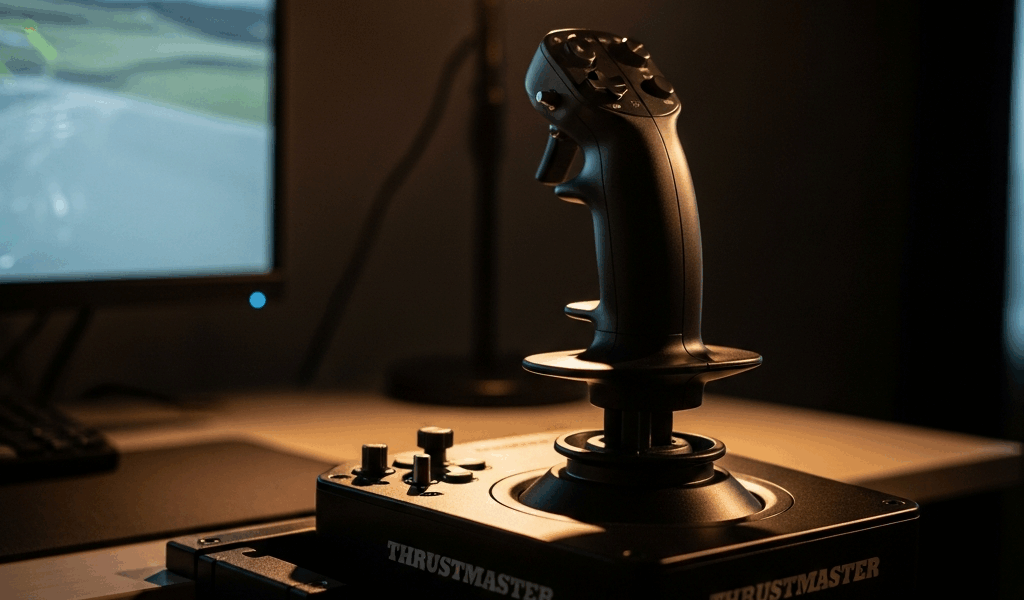
Quick Verdict — Who This Stick Is Actually For
Flight sim gear has gotten complicated with all the new options flying around. I’ve logged roughly forty hours across DCS, MSFS, and X-Plane with the Thrustmaster T16000M in 2025 — and honestly, the question of whether a T16000M review still matters in 2026 has a surprisingly clean answer. Yes. But only for three types of people. Buy this stick if you’re a complete newcomer with a hard budget under $100. Buy it if you’re upgrading from a gamepad and want to feel what real HOTAS input is like without gambling $300. Skip it entirely if you’re deep into study-level DCS modules or planning to get there soon. The T16000M isn’t broken. It’s just not the automatic default anymore. That distinction matters more than people admit.
The person this stick genuinely serves is someone like I was three years ago — curious about flight sims, skeptical about dropping serious cash, not yet sure the hobby would stick. For that person, the T16000M is still a real answer in 2026. Everyone else needs to read the tradeoffs section before they pull the trigger.
Build Quality and Ergonomics Up Close
Thrustmaster built this thing out of plastic. Not soft-touch. Not rubber-over-grip. Hard, lightweight plastic that feels durable enough for a decade of basement flying — but cheap enough that you’ll notice it the second you grab it after handling anything with actual metal in it.
The base is broad. Footprint runs roughly 6 inches wide by 8 inches deep. Small enough for a desk tray. Big enough to stay planted during aggressive inputs without sliding around. I ran it on three different setups — a standard desk, a lap tray, and an IKEA Uppspel desk mount. Held position on all three. No drama.
What actually surprised me was the ambidextrous design working the way it claims to. The stick is genuinely neutral — mount it left or right without any mechanical compromise. I switched hands mid-session once just to see what would happen. No dead zones. No weird tilt. If you’re left-handed and tired of being forced into right-handed stick geometry, or if you share a rig with someone, this actually solves a real problem.
The twist-rudder axis is viable. Not ideal, not as smooth as dedicated pedals — but viable. Two-hour sessions, my wrist was fine. Four hours, I felt it. The twist-to-rudder mapping read cleanly in all three sims. For anyone without space or budget for pedals, it’s a legitimate workaround. Not a hack.
Button count is low. Four-way hat, trigger, secondary fire, two side buttons. Eight inputs off the stick itself. The throttle base adds a few more, but that button density is the first wall you hit the moment you try anything complex.
How It Performs in MSFS, DCS, and X-Plane
Microsoft Flight Simulator
MSFS doesn’t punish low button counts. It rewards analog inputs. The T16000M’s two primary axes handle pitch and roll cleanly out of the box — sensitivity ships tuned for general aviation, which means a Cessna 172 and an Airbus A320 both respond predictably from flight one. I loaded the Daher TBM 930 and the stock Cessna 208 Caravan specifically to test this. Both handled well. No dead zones. No drift to speak of.
The twist rudder holds up here too. Wind corrections at altitude play out naturally. You’ll notice the difference compared to real pedals — but you won’t feel like you’re fighting broken hardware.
Digital Combat Simulator
This is where the T16000M’s limitations stop being theoretical. DCS modules — especially the F-16C and A-10C — are button-heavy by design. The F-16’s avionics menu alone demands twenty-plus mapped inputs across the HOTAS. The T16000M gives you eight stick inputs plus whatever you’ve squeezed onto the throttle base.
I spent three hours mapping the F-16. I got it working. It was genuinely miserable. Every system switch meant either navigating a menu or stacking modifier keys — SHIFT+button combinations that turned combat training into a finger puzzle. The stick itself tracked beautifully. Pitch and roll were precise. The button starvation killed everything else.
Simpler modules are a different story. The FA-50 Golden Eagle flies well here. The A-4E Skyhawk is practical. Anything under fifteen essential switches is manageable. Anything beyond that, and you’re fighting your own hardware.
X-Plane 12
X-Plane detects the T16000M automatically and maps it on the spot. You’re flying within minutes. The Cessna 172 is plug-and-play. The ZIBO 737 needs some configuration — nothing painful. X-Plane’s general philosophy of fewer inputs with more depth suits this stick’s profile almost perfectly.
What You Give Up Compared to Mid-Range HOTAS Options
Probably should have opened with this section, honestly. The T16000M’s real competition isn’t another budget stick. It’s the Logitech X56 and the Thrustmaster TCA Sidestick combo — both sitting in the $150–$200 range in 2026.
The X56 brings force feedback. You feel actual resistance on pitch and roll axes. The T16000M runs on spring tension alone — zero simulation of air resistance or g-load. That’s not a minor gap if you’re flying complex aircraft. DCS pilots feel it immediately.
The TCA Sidestick uses metal and glass construction. Lighter, more precise, and it holds up longer. The T16000M’s plastic will survive a decade of use — but it won’t feel like anything special after year two, and you’ll know it.
The throttle quadrant is functional but stripped down. One throttle axis. That’s the whole offer. The X56 and higher-tier HOTAS systems give you multi-engine control, dedicated flap handles, separate axes for different systems. If multi-engine flying matters to you, the throttle tier matters too.
But what is the T16000M in this context? In essence, it’s a capable entry point with a price ceiling that nothing else competes with below $100. But it’s much more than that — it’s also a ceiling of its own. That’s the honest version of the tradeoff.
Final Recommendation and Who Should Skip It
Buy the Thrustmaster T16000M if:
- You’re brand new to flight sims and testing whether the hobby sticks
- Desk space is genuinely tight
- Your budget is hard-capped at $100
- Your plans involve MSFS, X-Plane, or entry-level DCS modules
Skip it if:
- You’re already committed to study-level DCS aircraft
- You have room for a full HOTAS setup with dedicated pedals
- Force feedback is part of what you’re after
- Button count is mission-critical to how you fly
I’m apparently someone who runs light on inputs and doesn’t miss force feedback much — and the T16000M worked for me while the X56’s added bulk never quite fit my setup. Don’t make my mistake of assuming your preferences match mine. Check the tradeoffs against how you actually fly.
The T16000M in 2026 isn’t a regrettable purchase. It’s a tactical one. You’re trading maximum capability for cost and accessibility. That trade holds up — but only if you know exactly what you’re accepting before you open the box.
The upgrade path from here points toward the TCA Sidestick paired with a dedicated throttle, or straight to the Logitech X56. Both are genuine capability jumps. Neither one breaks the bank. So, without further ado — if you’re in the right profile, go get the T16000M. If you’re not, spend the extra $60 and skip the wall entirely.

Stay in the loop
Get the latest ultimate flight simulators updates delivered to your inbox.