Yoke vs Joystick vs HOTAS — Which Flight Sim Controller to Buy
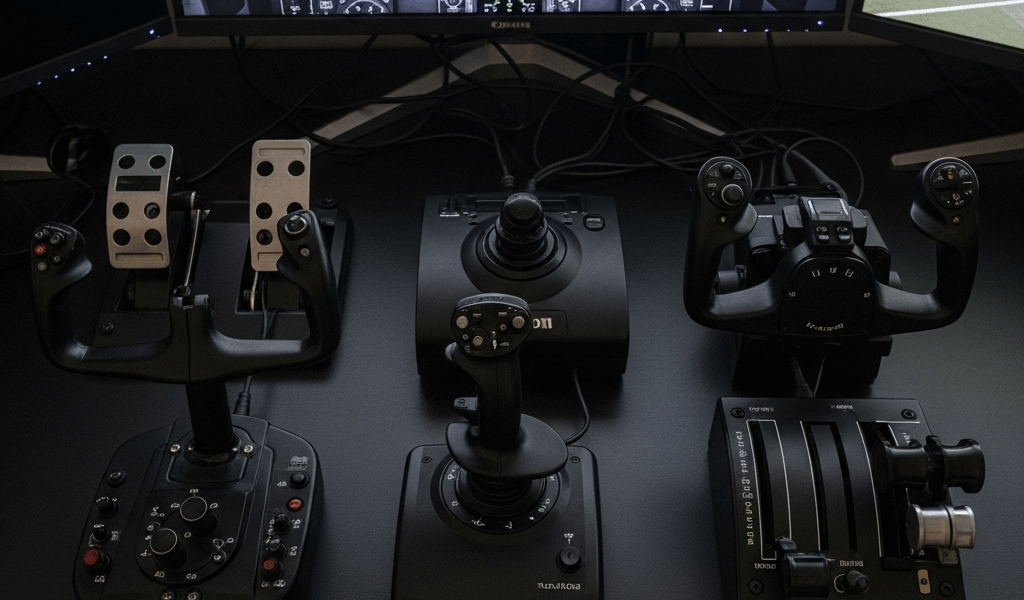
The flight sim yoke vs joystick vs HOTAS debate has been going on in forums since the early 2000s, and most of the advice out there is either a product listicle or a 47-page thread where nobody agrees on anything. I own all three controller types. A Honeycomb Alpha yoke, a Logitech Extreme 3D Pro joystick, and a Thrustmaster T.16000M HOTAS setup sit in my sim room right now. I’ve flown everything from a Cessna 172 in Microsoft Flight Simulator to an F/A-18 in DCS World, and the single most useful thing I can tell you is this: the right controller depends almost entirely on what aircraft you’re flying, not which controller has the best reviews on Amazon.
Nobody seems to lead with that. So let’s fix it.
Match Your Controller to Your Aircraft
This is the decision framework that should end the debate before it starts, and I genuinely don’t understand why most articles skip it entirely.
Real aircraft have real control inputs. Manufacturers design them for specific flight characteristics, pilot ergonomics, and operational roles. When you ignore that in a simulator, you’re already fighting yourself before you’ve even loaded a flight.
Yoke Aircraft
If you’re flying a Cessna 172, a Piper Cherokee, a Beechcraft Bonanza, or a Boeing 737, you need a yoke. Full stop. These aircraft use a column-and-wheel control system in real life. The yoke pulls back for pitch, rotates for roll. That’s it. When you try to fly a Cessna in MSFS with a joystick, you can do it — the sim doesn’t care — but the hand movements feel wrong. The muscle memory you build doesn’t translate to anything real. And if you ever want to use your sim time to complement real-world training, you’re actively building bad habits.
General aviation training sims at actual flight schools use yokes. There’s a reason for that.
Sidestick and HOTAS Aircraft
The Airbus A320 uses a sidestick. The F-16 uses a sidestick. The F/A-18 uses a stick. The Spitfire uses a stick. Helicopters use a cyclic, which is functionally a stick. If any of those are your primary aircraft, a joystick or HOTAS is not a compromise — it’s the correct answer.
I spent about six months flying the PMDG 737 with a joystick before switching to a yoke. The difference was immediate and honestly a little embarrassing. I’d been fighting the control inputs without realizing it. The moment I plugged in the Honeycomb Alpha and pulled back on that yoke column for the first time, the whole sim felt different. More connected. Like the aircraft and I were finally speaking the same language.
On the flip side, I once tried to fly a DCS F-16 mission with a yoke. We don’t need to talk about that.
Combat and Space Sims
DCS World, IL-2 Sturmovik, Star Citizen, Elite Dangerous — all of these either simulate aircraft with sticks or operate in three-dimensional space where a joystick’s full axis movement is the only input that makes sense. HOTAS specifically (Hands On Throttle And Stick) exists because real combat aircraft have dozens of controls mapped to the throttle and stick so pilots never take their hands off during a fight. When you’re in a dogfight at 400 knots and you need to fire a missile, switch radar modes, and deploy countermeasures without looking down, HOTAS stops being a luxury and starts being the whole point.
Budget Reality Check
Probably should have opened with this section, honestly. Because the best controller in the world doesn’t matter if it’s sitting on a wishlist you never pull the trigger on.
Here’s what the market actually looks like right now, without the marketing fluff:
Joystick — $30 to $80
The entry point for sim controllers. A Logitech Extreme 3D Pro runs about $50 new and has been essentially unchanged since 2002. That’s not an insult — it’s a testament to how well it works. You get a twist rudder axis, 12 programmable buttons, a four-way hat switch, and a throttle slider. For fifty dollars. It’s not precise enough for serious competition-level flying, and the plastic build quality is exactly what you’d expect at that price. But it works. It will get you flying tonight.
The Thrustmaster T.16000M steps up to around $75 and uses Hall-effect magnetic sensors instead of potentiometers, which means the stick doesn’t drift over time the way cheaper joysticks do. For anyone who’s had a joystick where the aircraft slowly rolls left on its own without any input — that’s potentiometer wear. Hall-effect sensors don’t have that problem. Worth the extra $25.
Yoke — $100 to $350
The budget end of the yoke market is rough. The CH Products Yoke has been around forever and works, but at around $100 it feels like flying with a toy. The control surface is small, the resistance is light, and the whole thing wobbles if you don’t have it clamped down firmly.
The Honeycomb Alpha Flight Controls yoke sits at around $249 and is genuinely the best value in the entire sim hardware space right now. Full metal shaft. Real detent for the nose wheel centering. Six-position ignition switch. Landing gear toggle. It feels like a real aircraft control in a way that nothing at the $100 price point comes close to. If you’re serious about GA simulation, this is your target.
Paired with the Honeycomb Bravo Throttle Quadrant at around $259, you have a complete GA or airliner setup for roughly $500. The Bravo has configurable levers that can simulate everything from a Cessna throttle/mixture/prop setup to a Boeing 737 autothrottle system.
HOTAS — $200 to $600+
The Thrustmaster T.16000M FCS HOTAS bundles the T.16000M stick with the TWCS throttle for around $200. This is where serious combat sim work starts. The throttle adds 14 action buttons, a ministick, and a smooth, weighted throw that gives you real throttle control feel. I used this setup for about a year in DCS before upgrading, and I still occasionally pull it out when the full setup feels like overkill for a quick flight.
The Turtle Beach VelocityOne Flightdeck sits at around $499 and is one of the most comprehensive single-unit HOTAS systems available at a non-professional price. It includes a full throttle quadrant, integrated rudder rocker, multiple weapon and avionics switches, and enough buttons and axes to cover almost any combat aircraft without buying additional hardware. The build quality is substantially better than the Thrustmaster entry-level gear — weighted metal components, more satisfying switch feel, tighter tolerances. If you’re building a dedicated combat sim station, this is the premium choice that won’t leave you wanting to upgrade in six months.
Pedals — $100 to $200 Added Cost
Rudder pedals aren’t the glamorous purchase. They don’t show up in the headline specs. But flying without them — especially in crosswind landings or any combat maneuvering — is flying with one hand tied behind your back. The Logitech G Pro Flight Rudder Pedals run about $140 and are a solid entry-level option. The Thrustmaster TFRP Rudder runs similarly. If your budget allows any flexibility, add pedals. You’ll notice it immediately.
Space and Setup Considerations
Frustrated by two failed attempts at mounting a yoke to a kitchen table, I eventually built a proper sim desk — but not everyone has that option, and I should have thought about it more carefully before my first purchase.
A joystick sits on your desk. You put it down, you fly, you pick it up when you’re done. It takes up maybe a six-inch square of desk space. If you share a desk with a family computer, if your sim setup lives on the dining room table, if you’re flying from a laptop in the living room — a joystick is the only controller type that actually works in those conditions. It requires nothing extra. No clamps, no mounting hardware, no dedicated furniture.
A yoke is a different situation entirely. The Honeycomb Alpha weighs about 3.5 pounds and has a C-clamp mounting system that requires a desk edge between 0.5 and 2.4 inches thick. The control column extends several inches in front of the desk when you push it forward. If you’re in a shared space, the yoke goes on, gets used, comes off. That’s manageable but annoying as a daily workflow. If you have a dedicated desk or sim station, it’s perfect.
HOTAS needs the most thought. The stick typically mounts or sits between your legs, or on the left and right sides of a chair — which means you either need a wide desk to place both units, or you invest in side-mount brackets. The Monstertech desk mounts for HOTAS hardware run around $80 to $120 per unit and clamp to desk edges or bolt to sim chairs. Without them, the stick tends to slide during aggressive maneuvering, which ruins immersion fast.
Dedicated sim cockpit frames exist — products like the Playseat Challenge or the Next Level Racing Flight Simulator Cockpit — and if you’re building a serious permanent station, they solve every mounting problem at once. But that’s a different article.
Specific Product Recommendations
Here’s where I land after owning and using these products over several years, not after reading spec sheets.
Best Budget Joystick — Logitech Extreme 3D Pro
Around $50. It has lasted longer than it has any right to. The twist rudder axis saves you from needing pedals right away. The button layout is intuitive enough that you can configure it in under an hour for almost any sim. It’s not exciting. It works.
Best Mid-Range Joystick — Thrustmaster T.16000M
Around $75. Buy this over the Logitech if your budget allows. Hall-effect sensors mean it stays accurate for years. It’s ambidextrous, which almost no other joystick at this price is. The trigger and hat switch are noticeably better quality.
Best Yoke — Honeycomb Alpha Flight Controls
Around $249. Nothing else at this price point is close. The metal construction, the ignition switch, the feel of the control column — it punches well above its category. Buy this with the Bravo throttle and you have a GA setup that will satisfy you for years.
Best Premium HOTAS — Turtle Beach VelocityOne Flightdeck
Around $499. The integrated design means fewer cable management problems, the build quality justifies the price, and the switch and button layout covers modern combat aircraft without requiring additional hardware. If you’re committed to combat sims and want one purchase that handles everything, this is it.
The Verdict
Four profiles. Four clear answers.
- First flight sim controller ever — Buy the Logitech Extreme 3D Pro or the Thrustmaster T.16000M. Learn the sim. Figure out what aircraft you actually want to fly. Then upgrade once you know.
- Dedicated GA sim pilot flying Cessna, Piper, or airliners — Honeycomb Alpha yoke plus the Bravo throttle quadrant. Add Logitech or Thrustmaster rudder pedals. This is the setup. It’s not cheap, but it’s right.
- Combat and space sim pilot — Thrustmaster T.16000M FCS HOTAS to start, Turtle Beach VelocityOne Flightdeck when you’re ready to commit fully. Add pedals as soon as budget allows.
- Mixed flying — some GA, some combat — This is the genuinely hard case. Most people in this situation end up owning both a joystick and a yoke and switching based on the session. It sounds excessive until you’ve tried flying a Spitfire with a yoke and understand immediately why that’s wrong.
The controllers don’t make you a better sim pilot on their own. But flying with the wrong one for your aircraft type creates a friction that works against you every single session. Match the controller to the cockpit you’re sitting in — virtual or otherwise — and the whole experience shifts from fighting your hardware to actually flying.
Start with the aircraft. The controller choice follows naturally from there.



Stay in the loop
Get the latest ultimate flight simulators updates delivered to your inbox.