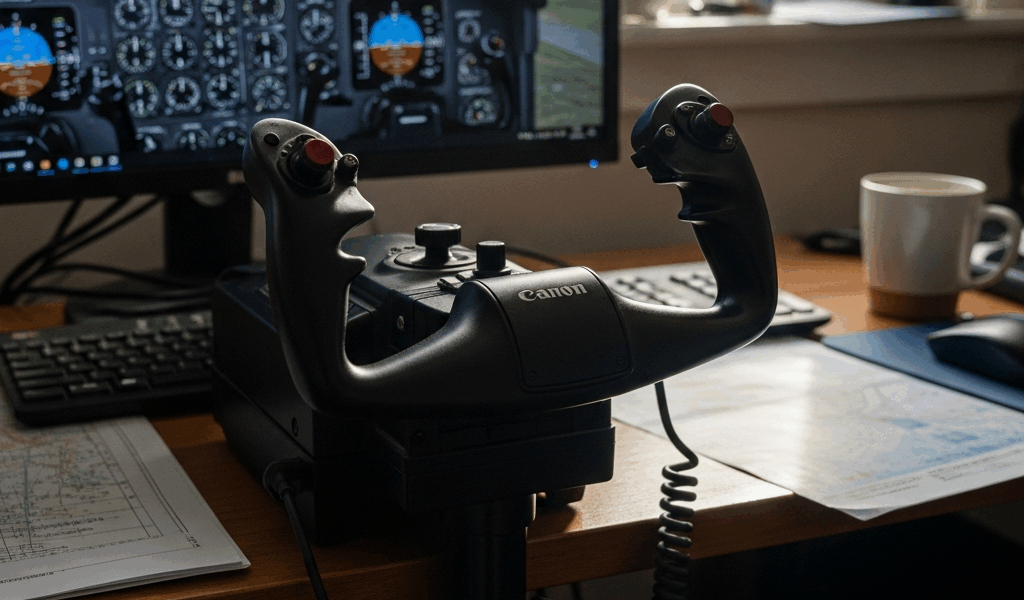
Logitech Flight Yoke System Review — Worth It in 2026?
Flight sim hardware has gotten complicated with all the new options flying around. As someone who’s been grinding Microsoft Flight Simulator 2024 for two solid years, I learned everything there is to know about entry-level yoke systems — the hard way, mostly. Today, I will share it all with you.
The Logitech Flight Yoke System has been around since 2020. That’s five years. In sim hardware terms, that’s basically a geological era. It still shows up as the most-Googled flight controller for newcomers, which tells you something — either it’s genuinely good, or people just don’t know what else to search for. Probably both. Either way, before you drop anywhere between $130 and $150 on this thing, you deserve a straight answer instead of a shrug.
What You Actually Get in the Box
The yoke runs on a gear-driven mechanical system. Not a potentiometer — a distinction that matters more than you’d expect. Gear-driven means tactile resistance. You feel the control column pushing back against you. Some pilots love that feedback. Others find it gritty, almost notchy, especially right around the neutral point. I’m apparently somewhere in the middle on this, and that’s fine.
Open the box and you’ll find the yoke itself, a throttle quadrant with three separate axes — throttle, prop pitch, mixture — a floor-mounted clamp, and a USB cable. Windows 11 recognizes it instantly on most machines. No driver hunting. Plug it in, and it appears as a controller. Done.
Build quality is honest plastic over metal internals. Not cheap. Not premium. The clamp holds firm on a desk edge — mine hasn’t slipped once. I’ve seen complaints about it walking around on carpet, which tracks. The throttle quadrant sits to the yoke’s right and responds well without going hypersensitive on you.
Total footprint lands around 24 inches wide by 12 inches deep. The whole assembly weighs under five pounds. Compact enough for a cramped desk setup, which is most of us.
Setting It Up in MSFS 2024 and X-Plane 12
Probably should have opened with this section, honestly. The biggest trap with this hardware isn’t the hardware at all.
I plugged it in at midnight on a Tuesday expecting a two-hour debugging session. Took about eight minutes total. MSFS 2024 sees the yoke immediately — it shows up as “Logitech Yoke” inside controller settings, clean and simple. The axis assignment screen is where new users tend to lose an hour of their life. The throttle quadrant defaults to bizarre mappings. Rudder. Trim. Random axes that make zero sense. You’ll need to manually reassign them inside the Sensitivity tab.
Here’s the fix, step by step: Open MSFS 2024 controls settings. Navigate to Sensitivity. Scroll down to Throttle Control. Reassign the throttle axis to the first slider on the Logitech quadrant. Repeat that for Prop Pitch, then Mixture. Save. Close everything. Restart the sim. It works perfectly after that. Five minutes once you know the path — thirty minutes of confusion if you don’t. Don’t make my mistake.
X-Plane 12 behaves completely differently. Plug and play, everything maps correctly on the first launch. If X-Plane is your primary sim, none of the above applies to you.
One last thing worth mentioning: there’s a noticeable deadzone at center. That’s the gear mechanism doing its thing — not a defect. New users almost always interpret it as broken hardware. It isn’t. You can soften it somewhat through the null zone sensitivity settings in MSFS, though it never fully disappears. After maybe three hours of flying, your hands stop noticing it entirely.
What It Feels Like to Actually Fly With It
Takeoff is clean. Pitch control has enough range for a Cessna 172 or a Piper Cherokee rotation without drama. Resistance builds naturally as you pull back. No weird surprises there.
Cruise is where the cracks show — at least if you’ve ever touched a Honeycomb Alpha. Pitch changes need deliberate, slightly exaggerated inputs. The precision feel of higher-end hardware just isn’t here. That said, it works. You’ll hold altitude. You’ll navigate a VOR approach. It does the job.
Landing is the gear-driven system’s weakest moment. That notchy center response creates small jerks during fine trim adjustments on final approach. I’ve personally adapted to it after enough hours. Others call it a dealbreaker — and honestly, I understand that position. The Honeycomb Alpha XPC runs around $300 versus the Logitech’s $140 street price, but it offers smoother potentiometer feel and more pitch travel. That $160 difference buys a meaningfully different experience.
GA planes are where this yoke belongs. Trainers, regional turboprops, bush planes — all good. Load an Airbus A320, and the control travel immediately feels compressed and wrong. The Logitech wasn’t built for the narrow, precise inputs airliners demand. Technically it functions. The feel, though, is off in a way that bothers you after a while.
Real talk for complete beginners: you won’t know what you’re missing. The Logitech feels normal because it’s your baseline. You’ll fly, improve, and have a genuinely good time with it. The “oh, so that’s what precision actually feels like” moment only arrives after upgrading. If you’re just starting out, that moment hasn’t happened yet — and that’s perfectly fine.
Who Should Buy It and Who Should Skip It
Buy It If
- Your budget is under $150 and that’s not changing
- You’re brand new to flight sim and testing the waters
- Minimal setup complexity matters to you
- GA aircraft or X-Plane 12 is your main focus
- You want hardware that works immediately, no driver scavenger hunt required
Skip It If
- You already own a joystick and want an actual meaningful step up
- Your budget can stretch to $250 or above
- Airliners in MSFS 2024 are your main thing
- Potentiometer smoothness matters more to you than gear-driven tactile feedback
- You’re planning to keep this hardware for the next five years — spend more now and skip the upgrade regret
That’s what makes the Logitech endearing to us budget-conscious sim pilots — it exists in a lane that nothing else really occupies at this price. No maybes. It’s a beginner yoke. If you’re not a beginner, the answer is probably no.
The Verdict — Does It Hold Up in 2026?
Yes, it works. No, it isn’t right for everyone. Those two things coexist without contradiction.
The Logitech Flight Yoke System is aging hardware that hasn’t actually gotten worse with age. MSFS 2024 compatibility is solid once you sort the throttle axis configuration. X-Plane 12 integration is seamless out of the box. The build quality remains what it was in 2020 — honest and functional. It delivers on its core promise.
I’m apparently the kind of pilot who flies GA almost exclusively, and the Logitech works for me while higher-end alternatives never justified the price jump at my skill level. For someone eyeing the Honeycomb Alpha or willing to save another two months, the Logitech won’t satisfy long-term. But that’s a different buyer entirely.
Check current pricing on Amazon or through Logitech’s official store before pulling the trigger — supply shifts around and better deals on next-gen options sometimes surface if you wait a few weeks. But if you want a working, simple, plug-and-play yoke that doesn’t require a weekend to configure, the Logitech still delivers exactly that in 2026. So, without further ado, go fly something.
Already own it? Follow the Logitech yoke setup guide for correct mounting, Windows axis testing, MSFS 2020/2024 profiles, and throttle assignments.



Stay in the loop
Get the latest ultimate flight simulators updates delivered to your inbox.