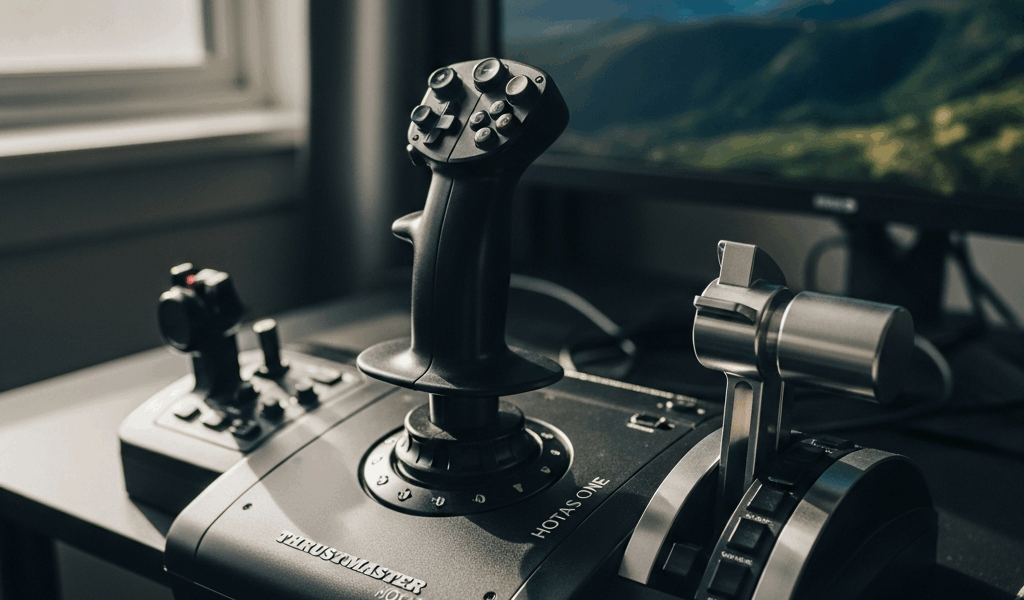
Quick Verdict — Who Should Buy the HOTAS One
Buying a flight stick has gotten complicated with all the conflicting reviews flying around. As someone who burned through three HOTAS One units across an Xbox Series X and a Windows 11 rig, I learned everything there is to know about this particular stick. Today, I will share it all with you.
Short answer: the Thrustmaster HOTAS One is worth your money if you’re a budget-conscious sim pilot on Xbox or PC flying Microsoft Flight Simulator — at least if you’re willing to block off two hours for calibration before your first real session. Flying DCS or combat sims 15+ hours a week? Skip it entirely and start saving toward a T16000M setup instead. The HOTAS One sits in this awkward middle space — better than the entry-level Logitech stuff, noticeably worse than mid-tier alternatives once you actually factor in how immersion degrades when your hardware is fighting you.
Build Quality and What You Actually Get in the Box
Opening the box feels deliberately sparse. You get the stick, the throttle quadrant, a USB cable, and — this part matters more than people expect — a small controller adapter specifically for Xbox. No desk clamp. No mounting hardware whatsoever.
The plastic hits you immediately. Both the stick grip and throttle housing are textured ABS — durable enough, probably, but it triggers that classic budget-peripheral anxiety the second your hands close around it. The stick itself runs about 1.2 pounds with a 4.5-inch throw. Adequate. Not generous. The 4-way hat switch (not 8-way, which will frustrate some people) sits naturally under your right thumb, and the trigger plus three side buttons all actuate consistently. No real complaints there.
The throttle quadrant is where things get murky. Friction detents feel loose straight out of the box — and a lot of users, myself included, notice the throttle sliding slowly downward the moment you release it mid-flight. Thrustmaster tightened the tension in later production runs, but older stock and secondhand units still carry this problem. You’ll be chasing micro-corrections constantly.
The twist rudder built into the stick works. Technically. The resistance is stiff enough that your wrist starts complaining after extended sessions doing coordinated turns in MSFS — forget sustained combat maneuvers.
Probably should have opened with this section, honestly. That twist rudder alone pushes plenty of pilots toward buying separate rudder pedals within the first month, which quietly destroys the whole cost argument for choosing the HOTAS One in the first place. Don’t make my mistake.
How It Performs in MSFS and DCS
I tested across two completely different sim environments because the performance gap between them is exactly what determines whether this stick belongs in your setup.
Microsoft Flight Simulator — Where It Shines
Flying a Cessna 172 around the Pacific Northwest in MSFS, the HOTAS One feels competent right away. Axis smoothness is acceptable out of the box. Pitch and roll respond linearly — none of that dead zone weirdness that plagued older Thrustmaster models. Cruising, approach work, gentle banking — all of it clicks within the first 20 minutes.
The default 5% dead zone is usable but a little aggressive. Drop it to 2% and elevator response sharpens noticeably without introducing drift. The stick self-centers reliably after input, which matters in civilian flying where small corrections add up fast.
But the throttle friction issue surfaces here in a real way. Precise power settings — the kind you need for descent planning and stable approaches — require constant babysitting. You’ll nudge the throttle forward, assume you’re set, then glance down three minutes later and realize you’ve drifted 50 feet below target altitude because the slider crept backward on its own. It’s maddening.
DCS and Combat Flight — Where It Struggles
Switching to DCS in the F/A-18C exposed the HOTAS One’s ceiling fast. The stick feels loose during high-G maneuvers. Rolling inputs are responsive enough, but sustained input through a dogfight reveals slight drift at the extremes of travel. Not catastrophic — just enough that you end up wrestling the controls instead of flying them.
The twist rudder becomes a genuine liability in this environment. Combat sims demand smooth, coordinated stick-and-rudder input happening simultaneously. That stiff twist resistance makes the whole thing uncomfortable inside 45 minutes of serious flying.
Axis sensitivity out of the box skews conservative — tuned for MSFS civilians, not military aviators. Budget an hour, minimum, reshaping curves in DCS’s control settings just to reach what a mid-tier stick hands you by default. That’s time you could be flying.
Setup and Calibration Tips for Better Performance
So you already bought it, or you’re committed. Here’s what actually moves the needle.
Dead Zone Adjustment — Critical First Step. Open MSFS control settings and pull the default dead zone from 5% down to 2%. Tightens the responsive zone around center without adding drift. On PC, run a full calibration cycle immediately after Windows first recognizes the stick — establishes a clean baseline for axis readings before you touch anything else.
Throttle Tension Fix. If your throttle is creeping downward, contact Thrustmaster support about a replacement unit. While you wait, fold a small piece of gasket material — even dense rubber sheeting works — and shim it under the throttle slider to add mechanical friction. Not elegant. Genuinely effective.
Sensitivity Curve Shaping. The default linear curve is fine for MSFS. In DCS, switch pitch and roll to exponential curves — start at an exponent value of 1.5, then tune from there based on how the Hornet actually feels under your hands. Fine authority near center, snappier response at the extremes.
Driver Updates on PC. Thrustmaster pushed firmware updates through 2025 that cleared axis jitter on specific Windows configurations. Check their support page before you start pulling the stick apart for diagnostics. Most performance headaches disappear with a clean driver reinstall.
Twist Rudder Reality. I’m apparently someone who flies coordinated turns constantly, and dedicated pedals work for me while the twist rudder never really did. Treat the twist rudder as supplemental input, not your primary rudder axis. If combat sims are your thing, put $80–$120 toward basic pedals — something like the Thrustmaster TFRP at around $99 — within your first month. That reframes the whole HOTAS One purchase: it’s a stick-plus-throttle starter kit, not a complete solution.
HOTAS One vs the Next Step Up — Should You Spend More
But what is the actual upgrade math here? In essence, it’s about $150–$180 separating a decent experience from a frustrating one. But it’s much more than that.
The HOTAS One runs $120–$140 depending on sales. The T16000M system — stick, throttle, and pedals bundled — lands at roughly $280–$320. That gap is real for a hobbyist. What it buys you: noticeably better build quality, no throttle creep problem, and a dedicated rudder axis that stops punishing your wrist. That’s what makes the T16000M endearing to us sim pilots who push gear past casual sessions.
Flying MSFS two or three hours a week on Xbox? The HOTAS One is defensible. You’ll stay comfortably inside the stick’s limits. The performance ceiling is low, but you genuinely won’t hit it that often at casual hours.
Flying combat sims 10+ hours weekly? Spend the extra money now. The HOTAS One starts feeling cheap fast under sustained military flying loads, and upgrading six months in costs more total than buying the better stick upfront.
The Logitech X52 Pro — currently around $200 at most retailers — sits in the same general range as the T16000M and offers better ergonomics for transport-category flying. Bigger buttons, more intuitive layout. Worse precision in combat. So, without further ado, let’s dive into the honest framing: choose based on what you’re actually flying, not what you think you might fly someday.
In 2026, the HOTAS One holds up as a legitimate entry point for Xbox sim pilots and PC beginners watching their budgets. It’s not a great stick. It’s not a trap either. Know its limits, calibrate it before you judge it, and performance will be acceptable. Just expect to want something better within a year — and you’ll sidestep the frustration that colors most honest reviews of this thing.

Stay in the loop
Get the latest ultimate flight simulators updates delivered to your inbox.