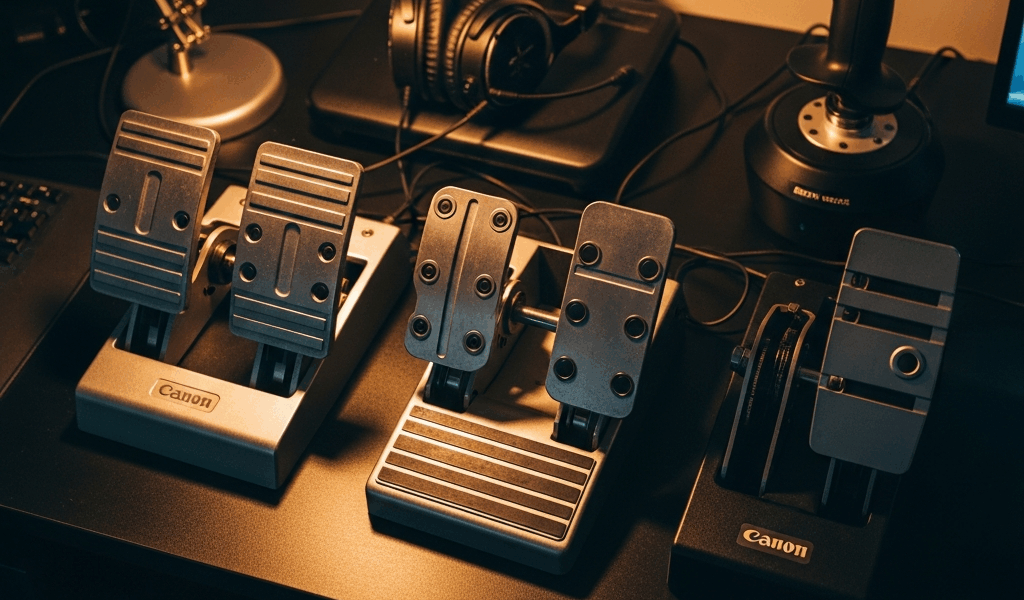
Why Rudder Pedals Matter for Flight Sims
I spent three months flying approaches in MSFS 2024 with nothing but my yaw axis mapped to a twist grip. Crosswind landings were a nightmare — everything changed the moment I plugged in actual rudder pedals.
Here’s the thing about rudder control: it transforms how you handle yaw input, especially during crosswind operations and ground handling. MSFS 2024’s wind simulation demands coordinated foot input. Your stick alone won’t cut it. Without pedals, you’re fighting asymmetric thrust, weathervaning into gusts, and burning out your wrist muscles. Real rudder pedals give you independent toe control that mirrors actual aircraft behavior, making landings smoother and turns more coordinated.
The good news? You don’t need $500+ to get legitimate pedal input. Sub-$200 options actually work with modern sims — if you pick the right model.
Our Top 3 Budget Rudder Pedals Ranked
Best Overall — Logitech Pro Flight Rudder Pedals ($179–$195)
Price & Where to Buy: Usually $179–$195 at Amazon, B&H Photo, or Newegg. I found mine marked down to $159 during a flash sale last month.
Build Quality: Solid plastic construction with spring-centered toe brakes. The pedal arms feel stable under moderate pressure — not as beefy as prosumer setups like Thrustmaster TPR, but they hold up fine. No creep issues reported in recent MSFS 2024 threads on Reddit.
Calibration Difficulty: Dead simple. Plug into USB, Windows auto-detects, assign axes in MSFS controls menu. I calibrated mine in under 60 seconds. No driver downloads required past standard Windows HID support.
MSFS 2024 Notes: Full axis compatibility. The Z-axis rudder works perfectly. Toe brakes map to separate axes without fiddling. Community feedback reports zero drift issues even after 200+ hours.
Verdict: If you’re buying new and want zero headaches, this is your pedal. Not the most premium feel, but reliability and ease justify the price. MSFS compatibility score: 9/10.
Best Budget — Thrustmaster T.16000M FCS Flight Pack ($149–$175)
Price & Where to Buy: Sits around $149–$175 depending on retailer. I’ve seen it drop to $129 on clearance at MicroCenter.
Build Quality: The pedals bundled here are genuinely serviceable plastic with magnetic spring centering. Not as refined as Logitech, honestly, but the stick quality makes the whole package feel like better value for your money.
Calibration Difficulty: Moderate difficulty. Thrustmaster driver installation required for full axis recognition — took me maybe 3 minutes. One gotcha though — MSFS sometimes defaults pedal axes incorrectly. You’ll need to manually assign Z-axis and toe brake axes in the controls menu.
MSFS 2024 Notes: Works without issues post-driver installation. Thrustmaster pushed a firmware update in October 2024 that tightened axis deadzone. Apply it before first flight. Rudder responsiveness is tight. Compatibility score: 8/10.
Verdict: Marginally cheaper than Logitech but requires slightly more setup legwork. That bundled stick adds value if you need a complete control setup, though standalone pedals alone are preferable if you already have a joystick.
Best for Expansion Potential — Saitek Pro Flight Rudder Pedals (Used, $80–$130)
Price & Where to Buy: Hunt eBay, Flight Sim forums, or Facebook Marketplace. Expect $80–$130 for units in good condition. I grabbed a mint-condition pair for $95 from a retiring simmer last year.
Build Quality: Metal shaft construction, heavier overall feel than Logitech or Thrustmaster. These pedals genuinely feel like they’ll last a decade. Toe brakes are satisfyingly clicky.
Calibration Difficulty: Here’s the catch — tricky. Saitek’s driver support is spotty on Windows 11. You’ll likely need community-compiled drivers or WinwingCompanion workarounds. Plan 20–30 minutes of research and driver hunting.
MSFS 2024 Notes: Works but demands driver fiddling. The community has documented solutions floating around. Axis mapping is solid once drivers are installed. Compatibility score: 6/10, and that’s not because of the hardware itself — it’s purely the driver availability headaches.
Verdict: Excellent bang-for-buck if you’re patient with driver setup. Better build quality than new budget options. Only recommend if you’re comfortable troubleshooting or you find a sub-$100 deal.
How to Avoid Calibration Hell
Probably should have opened with this section, honestly. I wasted an hour last year with a rudder axis that drifted 15 degrees mid-flight because I skipped a crucial step.
Step 1 — Update Drivers and Firmware First
Before plugging anything into MSFS, update your pedal’s driver software. Download directly from the manufacturer — Logitech has their drivers page, Thrustmaster has theirs. Restart Windows after installation. This prevents half the calibration nightmares people complain about online.
Step 2 — Reset Joystick Menu in Windows
Open Settings → Devices → Bluetooth and Devices → Connected Devices. Find your pedals, remove them, unplug the USB cable, wait 30 seconds, plug back in. Let Windows rediscover them fresh. This clears phantom axis assignments that ghost from old software installations.
Step 3 — Verify Axis Assignment in MSFS Controls
In MSFS 2024, go to Options → Sensitivity → Axes. Make sure Rudder is assigned to the Z-axis — or whichever axis your pedals report. Toe brake left and right should map separately. Test each pedal arm in the sensitivity menu. You’ll see real-time axis output. If an axis shows erratic values or won’t register, your pedals may be failing or drivers are incomplete.
Step 4 — Deadzone Tuning
Set rudder deadzone to 0–3% in MSFS. Budget pedals don’t need aggressive deadzone. Too much deadzone kills responsiveness. Test a crosswind approach. If the aircraft drifts without pedal input, your deadzone is too high.
Budget Alternatives If You Need to Go Cheaper
Not everyone has $150 sitting around. Real alternatives exist — at least if you’re willing to hunt a bit.
Used Market Hunting: Flight Sim forums and eBay regularly see older VPC pedals, Saitek models, or even CH Products rudders for $50–$100. Quality varies wildly — inspect photos carefully and ask sellers about calibration history. I’ve seen pristine Saitek pedals go for $90.
Entry-Level Brands: Companies like Defender make basic USB rudder pedals for $70–$100. Build quality is plastic-heavy and driver support is thin, but they functionally work. MSFS integration is possible though not guaranteed.
DIY Pendulum Pedals: The flight sim community publishes open-source plans for Arduino-based homemade pedals. Check r/flightsim and Flight Sim forum DIY threads. Cost roughly $50–$80 if you’re handy with electronics. Not for everyone, but they work.
What to Avoid in the Sub-$200 Market
Some budget options are genuinely problematic. Don’t make my mistake.
Avoid: Vintage CH Products Pedals (Pre-2015)
Older CH pedals have calibration issues with Windows 11 and MSFS 2024. Driver support was discontinued years ago. You’ll spend hours fighting legacy software. Skip them unless you find one for under $50 and enjoy tinkering as a hobby.
Avoid: Off-Brand USB Pedals Under $60
Generic “flight sim pedals” from Amazon third-party sellers often report to Windows as single-axis devices. Toe brake separation becomes impossible. MSFS can’t properly calibrate them. Avoid these entirely unless reviews explicitly confirm multi-axis support.
Avoid: Thrustmaster TPR Lite (if you find one)
This discontinued model has documented spring creep — pedals slowly drift centerline over 6 months. Not worth the hassle, even used. The standard FCS bundle is a better choice.
Budget rudder pedals have genuinely improved. Two years ago, sub-$200 options were risky. Today? Logitech and Thrustmaster deliver real reliability. Pick one, calibrate it correctly, and you’ll have functional rudder input for years.

Stay in the loop
Get the latest ultimate flight simulators updates delivered to your inbox.